
Brand/ Manufacturer:
Dimensions:
5x3.5x 3.6cmWeight:
0.1kgCountry of Origin: :
United StatesDescription:
CompactFlash card
|
Mfr. Part Number: |
2711P-RW3 |
|
|
|
|
Manufacturer: |
|
|
|
|
|
Description: |
The automation 2711P-RW3 is a 256 MB Internal CompactFlash card. The memory card has factory installed with a Machine Edition software
|
|
|
|
|
Full Description: |
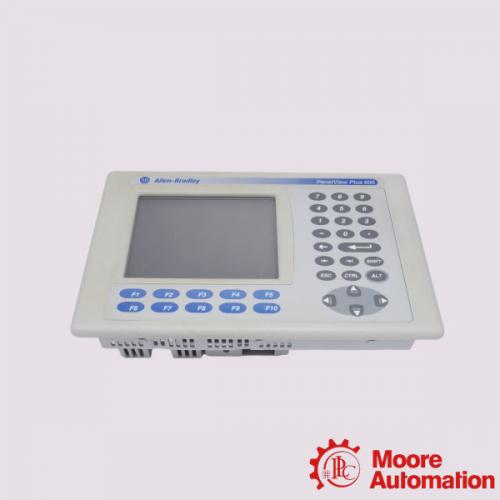
The 2711P-RW3 is used with PanelView plus logic modules. Unlike Random Access Memory (RAM), the 2711P-RW3 does not erase its contents when the power goes off |
 plcsale@mooreplc.com
  + 86 18030235313
  dddemi33
  2851195473
About 2711P-RW3
The automation 2711P-RW3 is a 256 MB Internal CompactFlash card. The memory card has factory installed with a Machine Edition software. The 2711P-RW3 is used with PanelView plus logic modules. Unlike Random Access Memory (RAM), the 2711P-RW3 does not erase its contents when the power goes off. Although the CompactFlash card comes pre-installed in the PanelView plus terminal, it can be replaced in case of a fault. As the 2711P-RW3 is a storage device, it is prone to electrostatic discharges. Therefore, proper grounding and handling should be observed when handling the 2711P-RW3 Internal CompactFlash card.
When replacing the 2711P-RW3, as with all other Compact Flash cards, an RSView ME version 3.10 or newer will be required. If the PanelView plus terminal that you are replacing the 2711P-RW3 has an older version of the RSView ME, you should first upgrade it before replacing the CompactFlash card. The 2711P-RW3 Internal CompactFlash card is located on the back of the PanelView plus logic module. To access it, you have to unscrew the safety cover on the rear side of the PanelView Plus terminal by first laying it down on a flat surface then. Locate the Compact Flash slot next to the RAM slot and loosen the retaining screw. Remove the old Compact Flash card and replace it with the new one. While performing the replacement, ensure that power supply to the PanelView Plus terminal is disconnected to avoid injury to the internal circuitry of the terminal. After replacing, you will need to copy the configuration settings found in the ".MER" file. To do this, connect the old Compact Flash card to the terminal as an external card, access it from the terminal’s settings tab, select the copy applications command, on the screen that pops up, specify the external storage as the source, select the ".MER" file, use the destination button to select the 2711P-RW3 Internal Compact Flash card and hit the copy button. Test the new CF card by powering on the PanelView plus and launching the ".MER" file.
Other hot selling product models:
SIEMENS
6AV6545-0DA10-0AX0
SIEMENS
6SL3040-0PA01-0AA0
SIEMENS
6ES7315-2EH14-0AB0
SIEMENS
6ES7321-1BL00-0AA0
SIEMENS
6ES7416-2XN05-0AB0
SIEMENS
6ES7972-0BB12-0XA0
SIEMENS
6ES7322-1BL00-0AA0
SIEMENS
6ES7952-1AP00-0AA0
SIEMENS
6ES7331-7PF01-0AB0
SIEMENS
6ES7153-1AA03-0XB0
SIEMENS
6ES7431-0HH00-0AB0
SIEMENS
6ES7231-4HD32-0XB0
SIEMENS
6AV2124-0JC01-0AX0
SIEMENS
6ES7952-1AS00-0AA0
SIEMENS
6DD1683-0CC0
SIEMENS
6ES7392-1BJ00-0AA0
SIEMENS
6AV6 648-0CC11-3AX0
SIEMENS
6ES5095-8MA05
SIEMENS
6AV2124-0GC01-0AX0
SIEMENS
6ES7215-1AG40-0XB0
SIEMENS
6ES7214-1BG40-0XB0
Picture/ Video Request
It's like having the store come to you!
Quick Quotes :
Receive price & availability FAST from our dedicated customer service team.Delivery :
Expedited, Freight, and International shipping available.
Warranty :
If there's a problem, we'll make it right. Your satisfaction is how we measure success!Returns :
No hassle return policy.Repair :
Our team of engineers are creative problem solvers who understand your challenges.Payment :
Custom Calibration :
You give us the specs and we do the rest.Share this page :

Tweet

Share

Share

Email Us
Tel : +86 18030235313
Whatsapp & Wechat : +86 18030235313
Email : 849250460@qq.com
Email : plcsale@mooreplc.com



 1 Year Warranty